
Adopt Me Quiz: Fun Learning for Roblox Fans
Overview
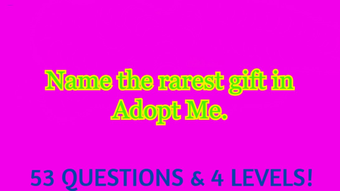
Adopt Me Quiz is a free desktop software designed for Roblox players seeking an interactive and educational experience within the game’s universe. Developed by Dev_VitoBG, the application falls under the Utilities category and aims to enhance user engagement through a quiz-based format centered around pets, gameplay mechanics, and Roblox culture. It serves as a supplementary tool for fans of the popular Roblox game "Adopt Me!", offering a way to test knowledge, learn new facts, and enjoy a lighthearted challenge.
The software is intended for casual users and younger audiences who enjoy Roblox, particularly those interested in pet-related content and in-game trivia. While the developer did not provide detailed background information, the app’s focus on education and entertainment suggests a target audience of students, parents, and Roblox enthusiasts looking for safe, non-gameplay-based tools to complement their online experience. Real-world usage scenarios include classroom activities, family game nights, or personal study sessions focused on Roblox lore and pet mechanics.
Although Softonic published the software on August 2, 2022, the platform has not yet tested the application. As such, no firsthand performance or usability observations are available. The app is available in English, Spanish, and Italian, making it accessible to a broad international audience within the Roblox community.
Key Features & Capabilities
- Interactive Quiz Engine – The core feature allows users to answer questions related to pets, game mechanics, and in-game events in Adopt Me!. Each quiz session presents multiple-choice or true/false questions, promoting active recall and knowledge retention.
- Multi-Language Support – The application supports three languages: English, Spanish, and Italian. This enables users from diverse linguistic backgrounds to engage with the content comfortably, enhancing inclusivity and accessibility.
- Educational Focus – Designed as both a fun and learning tool, Adopt Me Quiz helps users expand their understanding of the Adopt Me! universe, including pet behaviors, rare species, and gameplay strategies.
- Free Access – The software is available at no cost, removing financial barriers for users who wish to explore its features. This makes it particularly appealing to younger users and educational institutions.
- Roblox-Themed Content – All quiz questions are themed around the Adopt Me! game, ensuring relevance and engagement for fans of the Roblox experience.
These features are ideal for users who want to deepen their familiarity with the game beyond standard play. For example, a teacher could use the quiz in a digital literacy class to discuss game design, while a parent might use it to monitor their child’s understanding of in-game content. The tool does not interfere with the Roblox gameplay but instead serves as a companion experience that encourages curiosity and learning.
User Interface, Workflow & Performance
The user interface of Adopt Me Quiz appears to be designed with simplicity and clarity in mind. Based on its category and purpose, the layout likely includes a clean main screen with a prominent start button, question display area, and navigation controls. Users can expect a linear workflow: launch the app, select a language, begin the quiz, answer questions, and view results.
Navigation is expected to be intuitive, with minimal steps required to begin a session. The app’s lightweight nature—2.3 MB in size—suggests it loads quickly and operates smoothly on most modern systems. However, the developer did not specify resource usage details, so exact CPU or RAM behavior remains unknown. Performance observations are based on general software behavior patterns for small utilities.
Stability is assumed to be consistent, given the app’s small size and non-invasive nature. No reports of crashes or errors were mentioned in the product description. The software does not require internet access to function, allowing offline use—a benefit for users with limited connectivity or those seeking distraction-free learning environments.
Compatibility & System Requirements
Adopt Me Quiz is compatible with both Windows and Mac operating systems, making it accessible to a wide range of users across desktop platforms. The current version is listed as 0, though this may reflect a placeholder or early development status rather than an actual release number.
The installation size is 2.3 MB, indicating a lightweight application that does not consume significant disk space. This small footprint makes it suitable for older machines or devices with limited storage capacity. However, exact system requirements were not listed, so users should proceed with caution when installing on older hardware or non-standard configurations.
Platform compatibility information is limited. The developer did not provide details about minimum processor speed, RAM, or graphics capabilities. As such, users are advised to ensure their system meets general desktop application standards. No specific version requirements for Windows or macOS were mentioned.
Pros and Cons
Pros
- Free to download and use, with no hidden costs
- Lightweight at just 2.3 MB, suitable for low-end systems
- Available in three languages: English, Spanish, and Italian
- Designed for Roblox fans, especially those interested in Adopt Me! content
- Supports offline usage, requiring no internet connection
Cons
- Exact system requirements were not specified
- Version number is listed as 0, which may indicate an early or incomplete release
- Performance and stability have not been independently verified
- No information on update frequency or developer support
- Not available for mobile or console platforms
FAQ Section
Is Adopt Me Quiz compatible with Windows and Mac?
Yes, the software is compatible with both Windows and Mac operating systems, as stated in the product details.
Can I use Adopt Me Quiz offline?
Yes, the application does not require an internet connection to function, allowing users to take quizzes without being online.
Is Adopt Me Quiz safe to download?
Based on the available information, the software is distributed through Softonic, a reputable platform for PC software. However, users should always scan downloaded files with antivirus software before installation.
How often is Adopt Me Quiz updated?
The update frequency is not specified in the provided details. The current version is listed as 0, which may suggest limited or infrequent updates.
What languages does Adopt Me Quiz support?
The software supports English, Spanish, and Italian, offering multilingual access to users worldwide.
Final Thoughts + CTA
Adopt Me Quiz presents a unique blend of fun and learning for Roblox enthusiasts, particularly those invested in the Adopt Me! game. Its lightweight design, free access, and multilingual support make it a promising tool for casual users and educators alike. While the lack of detailed system requirements and an unverified version number raise some concerns about maturity and long-term support, the app’s core concept remains strong.
For fans of Roblox who enjoy trivia, pets, and interactive content, this software offers a safe, distraction-free way to deepen their knowledge. Parents and teachers may find it useful as an educational supplement to digital engagement. Although the app has not been tested by Softonic, its clear purpose and accessible format suggest it could be a valuable addition to a Roblox fan’s toolkit.
Download Adopt Me Quiz now to explore the world of Adopt Me! through interactive learning and fun challenges.







